One of the more challenging aspects of the StudentCam competition can be finding clips of C-SPAN video programming that best complement your documentary’s theme. You should NOT be paying to download C-SPAN footage for use in your documentary. If you need help finding video related to your topic, please email us at: educate@c-span.org.
You are not required to use a specific amount of C-SPAN video, but one of the criteria your video will be judged on is the relevance of the C-SPAN clips that you select for use in your documentary. We recommend that you consider using several short video clips from C-SPAN programs throughout your documentary in order to show background, context and/or varying viewpoints related to your chosen issue. We also suggest that any individual C-SPAN clip used should not run longer than 15-20 seconds at a time. Review some of the past winning videos to see how other students have used C-SPAN video clips to enhance their documentaries.
To makes things easier for students, we host a large library of ready to downloads clips that you can stream and download for free through Dropbox file hosting.
Start by searching the StudentCam Downloads page by keywords related to your topic. Click a link to open the Dropbox video of the clip you would like to download.
You can download the Dropbox video file by either clicking File -> Download, or clicking this download icon:

When the pop up window appears, scroll to the bottom of the box that pops up and then click on this button:
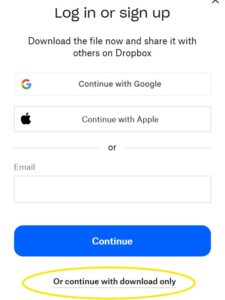
That will save the video file to your computer, and you can then chop out the portions you want to use in your editing software.